GCS settings (SYS CONFIG)
The SYS CONFIG tab holds the settings of the ground station itself — what it shows and how — as opposed to SETUP, which configures the vehicle. Everything here is remembered between sessions on this computer, except where noted. Two panels write to the vehicle: MAVLINK STREAM RATES and, indirectly, the flight stack’s suggested link.
| Panel | |
|---|---|
| FLIGHT STACK | ArduPilot, INAV or Betaflight |
| NAVIGATION | absolute (GPS) or relative position |
| SYSTEM CONFIG | language, altitude offset, terrain folder, 3D model, light, smoothing, frame rate, satellite detail, satellite and terrain radius, DevTools, debug log |
| GCS OPTIONS | ADS-B traffic, ground clamp, battery voltage range |
| ROTOR LOAD | the motor output schematic |
| SIYI CAMERA STREAM | the FPV video address |
| OFFLINE DATA DOWNLOAD | imagery and elevation for an area, ahead of time |
| HUD DATA FIELDS | the six data cells beside the HUD |
| MAVLINK STREAM RATES | how often the vehicle sends each group of messages |
FLIGHT STACK
| Field | |
|---|---|
| ENVIRONMENT | ArduPilot · Copter / Plane / Rover, INAV · waypoint missions over MSP, Betaflight · acro, no navigation. Decides the link protocol suggested, which SETUP pages are available and which mission features can be planned. |
| SUGGESTED LINK | The connection type and baud rate that go with it (MAVLink serial 57 600, MSP serial 115 200). |
The hint underneath says what changes. Details in Getting started → choose the flight stack.
NAVIGATION
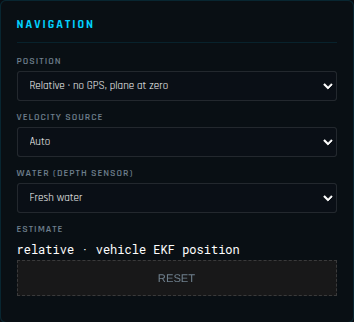
| Field | |
|---|---|
| POSITION | GPS · absolute, map and terrain (default) or Relative · no GPS, plane at zero — for a vehicle that has never had a GPS: a ROV, a flight with no GNSS. |
| VELOCITY SOURCE | What the GCS dead-reckons on when the vehicle sends no local position of its own: Auto, Airspeed + heading, Ground speed + heading, EKF velocity. |
| WATER (DEPTH SENSOR) | Fresh (997 kg/m³) or Sea (1 025 kg/m³) water, to turn a sub’s pressure into depth. |
| ESTIMATE + RESET | Where the position comes from right now; RESET starts the relative position and its track again from zero. |
Everything about the relative mode — what it draws, the dead reckoning, what ArduPilot sends without GPS — is in navigation without GPS.
SYSTEM CONFIG
| Field | Default | |
|---|---|---|
| LANGUAGE | English | English or 中文 (Simplified Chinese), for the whole interface. |
| ALTITUDE OFFSET (M) | 0 | Added to every vehicle altitude in the 3D view and the altitude cell, to line the reported altitude up with the terrain model when they disagree (a barometer drift, a different geoid). Not remembered: it is a correction for the flight at hand. |
| TERRAIN (HGT FOLDER) + SELECT HGT FOLDER | Load SRTM .hgt elevation tiles from a folder of your own (offline, or a better DEM). The line under it shows what is loaded (NO DATA before any terrain). Tiles are otherwise downloaded automatically — see terrain and imagery. | |
| 3D MODEL | follows the vehicle | The aircraft model drawn in 3D: the .glb / .gltf files in the models/ folder (quadcopter, hexa, octo, tricopter, plane, flying wing, quadplane VTOL, helicopter, rover, boat, ROV, submarine, airship, antenna tracker), plus your own. When a vehicle connects, the model switches to its type; choose another here to override. |
| MODEL SCALE | 1.0 | 0.1 to 5×: makes the model larger to find it at a distance, or true to size. |
| TIME OF DAY (DEBUG) | the clock | Moves the sun to any time (00:00–24:00) for the sunlight shading — to check a shadow or simply see better. |
| MAP BRIGHTNESS (STATIC) | 0.85 | 0.3 to 1.6. Shown only when the sunlight is off or the satellite imagery is off: the brightness of the flat-lit imagery, or of the whole schematic chart. |
| MOTION SMOOTHING | 0.15 | 0 to 0.5. Telemetry arrives at 25 Hz or less while the 3D view draws 60 frames a second. Above 0, the 3D view and the HUD carry the aircraft forward between samples (for at most 0.5 s after the last one, then it holds) on its reported velocity, acceleration and rotation rates, and blend each new sample in over the slider value × 0.5 s (75 ms at the default) instead of jumping to it. 0 = drawn exactly as received (moves in steps, most visible low and fast). |
| 3D FRAME RATE | 60 FPS | 60 FPS or 30 FPS (ECO): 30 halves the rendering work — use it on battery or on a weak GPU. |
| 3D SATELLITE DETAIL (ZOOM) | 18 · 0.4 m | The sharpest imagery drawn around the aircraft: 16 (off) to 20 (0.1 m per pixel). Each step doubles the detail and the download — see satellite detail. |
| 3D SATELLITE RADIUS | 10 km | How far around the aircraft the 3D terrain has satellite imagery: 5, 10, 15, 20 or 30 km. Beyond it the terrain is coloured by height. A wider radius downloads more tiles (for offline flights, make the offline download box cover it) and asks more of the computer: on a weak one stay at 10–15 km. See terrain range and haze. |
| 3D TERRAIN RADIUS | 35 km | How far around the aircraft the 3D terrain is built: 35, 50 or 70 km. The haze follows it: a farther edge, thinner haze. 50 km builds about twice the terrain of 35 km and 70 km four times, with more elevation tiles in memory (25 MB each). |
| DEVTOOLS → OPEN DEVTOOLS | Opens the Chromium developer tools (console, network) in a separate window — for troubleshooting with support. | |
| DEBUG LOG (LAST 5 MIN) → SAVE COPY… | Saves one file with the last 5 minutes of this session and of the previous one (connections, errors, autopilot messages, commands sent): send it to support when reporting a problem. The path saved to is shown underneath. | |
| SHOW FILE | Shows the live debug log file in the file manager (data/debug/corv-gcs-debug.log, rewritten every few seconds). |
GCS OPTIONS
| Field | Default | |
|---|---|---|
| ADS-B TRAFFIC — Show ADS-B traffic overlay | on | Manned aircraft from OpenSky and from an onboard receiver, in 3D, on the mini-map and in the traffic table. The same switch as SHOW ADS-B TRAFFIC in the side panel. See ADS-B traffic. |
| GROUND CLAMP — Clamp model to terrain surface | on | Never draws the vehicle under the terrain model: where its altitude is below the ground (SRTM is ±5 m, barometers drift) it is lifted onto the surface, so a landed vehicle sits on the ground. Over water it does not apply (a ROV dives). Untick to see the raw altitude. |
| BATTERY MIN VOLTAGE | 9.6 V | The empty voltage, for the battery percentage when the vehicle does not report one. |
| BATTERY MAX VOLTAGE | 12.6 V | The full voltage. |
| CELLS (AUTO) | 3S | The cell count worked out from the maximum (4.2 V per cell): check it matches your pack. |
Example for a 6S Li-ion pack: min 18.0 V (3.0 V per cell), max 25.2 V.
ROTOR LOAD
The schematic at the bottom right of the flight screen, each motor coloured by its output.
| Field | Default | |
|---|---|---|
| SCHEMATIC — Show rotor load schematic | on | The same switch as SHOW ROTOR LOAD in the side panel. |
| FRAME | AUTO (from MAV_TYPE) | Or force: single rotor (plane / heli), tricopter, quad, hexa, octo, deca, dodeca. |
| MOTORS OFF PWM (SCALE MIN) | 1000 | The PWM at which the gauges read empty. |
| SCALE MAX PWM | 2000 | The PWM at which they read full. |
| GREEN ABOVE PWM | 1100 | Below it a motor reads blue (stopped). |
| ORANGE ABOVE PWM | 1500 | |
| RED ABOVE PWM | 1700 | A motor in the red for long is near its limit: no control margin left on that arm. |
| SINGLE ROTOR CHANNEL | 3 | For a plane or helicopter, the output shown as the main rotor: ArduPlane throttle = 3, heli RSC = 8. |
On a healthy multirotor in a hover all motors sit in the same colour; one constantly higher shows a centre of gravity off to that side, a weak motor or a twisted arm.
SIYI CAMERA STREAM
The RTSP video for the FPV button:
| Field | Default (SIYI) |
|---|---|
| IP ADDRESS | 192.168.144.25 |
| RTSP PORT | 8554 |
| STREAM PATH | /main.264 |
| TARGET FPS | 30 (1–60) |
The PC’s network adapter needs a static IP in the camera’s subnet (for SIYI 192.168.144.x, e.g. 192.168.144.100), and ffmpeg must be installed and in the PATH. Any RTSP camera works with its own address and path (rtsp://IP:PORT/PATH).
OFFLINE DATA DOWNLOAD
Downloads an area ahead of a flight without network.
| Field | |
|---|---|
| NORTH LAT / SOUTH LAT / WEST LON / EAST LON | The box, in whole degrees. |
| SATELLITE ZOOM MAX | The sharpest imagery to keep, 1–19 (16 ≈ 2 m per pixel; every level up is four times the tiles). |
| Satellite tiles / SRTM1 elevation | What to download: imagery, 30 m elevation tiles, or both. |
| Estimate | How many tiles and how much data the choice means — check it before starting. |
| DOWNLOAD / CANCEL | Start / stop; a progress bar and a status line follow. |
Tiles go to the same cache the GCS fills while flying, so they are used automatically. For a mission area, a box of 1° × 1° at zoom 16 is a good start; add zoom 18–19 only for the few square kilometres you will fly low over.
HUD DATA FIELDS
The six data cells beside the HUD: LEFT 1–3 and RIGHT 1–3, top to bottom. For each:
| Control | |
|---|---|
| Field | Airspeed, Ground Spd, Vert Speed, G-Load, Altitude (MSL), Terr Alt (AGL), LiDAR, Roll, Pitch, Heading, Battery V / A / %, GPS Sats, GPS HDOP, Link Qual, Vib X / Y / Z, AoA, SSA (sideslip), RTK Base (baseline, mm), RTK Acc (accuracy, mm) |
| Multiplier (×1) | The value is multiplied by it: ×3.6 shows m/s as km/h, ×1.944 as knots, ×3.281 metres as feet. |
| Unit (auto) | Your own unit label for the cell (km/h, kt, ft); empty = the field’s own. |
RESET DEFAULTS goes back to Airspeed, Ground Spd, G-Load / Altitude, Terr Alt, LiDAR.
MAVLINK STREAM RATES
How many times a second the vehicle sends each group of messages (SR0_*, the rates of the autopilot’s SERIAL0 port, normally its USB):
| Field | Parameter | Default | Carries |
|---|---|---|---|
| RAW SENSORS | SR0_RAW_SENS | 2 | IMU, pressure, raw GPS |
| EXT STATUS | SR0_EXT_STAT | 2 | system status, battery, GPS status, mission current |
| RC CHANNELS | SR0_RC_CHAN | 5 | RC inputs, servo outputs (radio calibration, rotor load) |
| RAW CTRL | SR0_RAW_CTRL | 1 | |
| POSITION | SR0_POSITION | 3 | GLOBAL_POSITION_INT, LOCAL_POSITION_NED |
| EXTRA1 (ATTITUDE) | SR0_EXTRA1 | 10 | ATTITUDE |
| EXTRA2 (VFR HUD) | SR0_EXTRA2 | 10 | VFR_HUD (speeds, altitude, climb) |
| EXTRA3 | SR0_EXTRA3 | 1 | vibration, EKF status, terrain, battery details |
| PARAMS | SR0_PARAMS | 10 | parameter download rate |
READ STREAM RATES loads the vehicle’s values; WRITE STREAM RATES sends all nine (each field flashes green when written, red on failure). Lower them on a slow radio (a 19 200-baud link cannot carry everything at 10 Hz); raise POSITION and EXTRA1 to 10 Hz or more for the LiDAR and ROS surfaces, which place every point with the telemetry pose.
WRITE also applies the rates to the link in use, whatever port of the autopilot it arrives on (a radio or the cellular module on TELEM1 or TELEM2): it requests each group at the new rate and pins ATTITUDE, ATTITUDE_QUATERNION, VFR_HUD, RAW_IMU and VIBRATION to it. These link rates last until the autopilot restarts; to keep them, set that port’s SR1_* or SR2_* in PARAMETERS as well. The autopilot refuses a rate above what its main loop allows (STATUSTEXT Requested rate … too fast. Increase SCHED_LOOP_RATE). On the cellular link the GCS asks for the rates again whenever the module restarts, for example when the drone is powered up.