Radio link planning
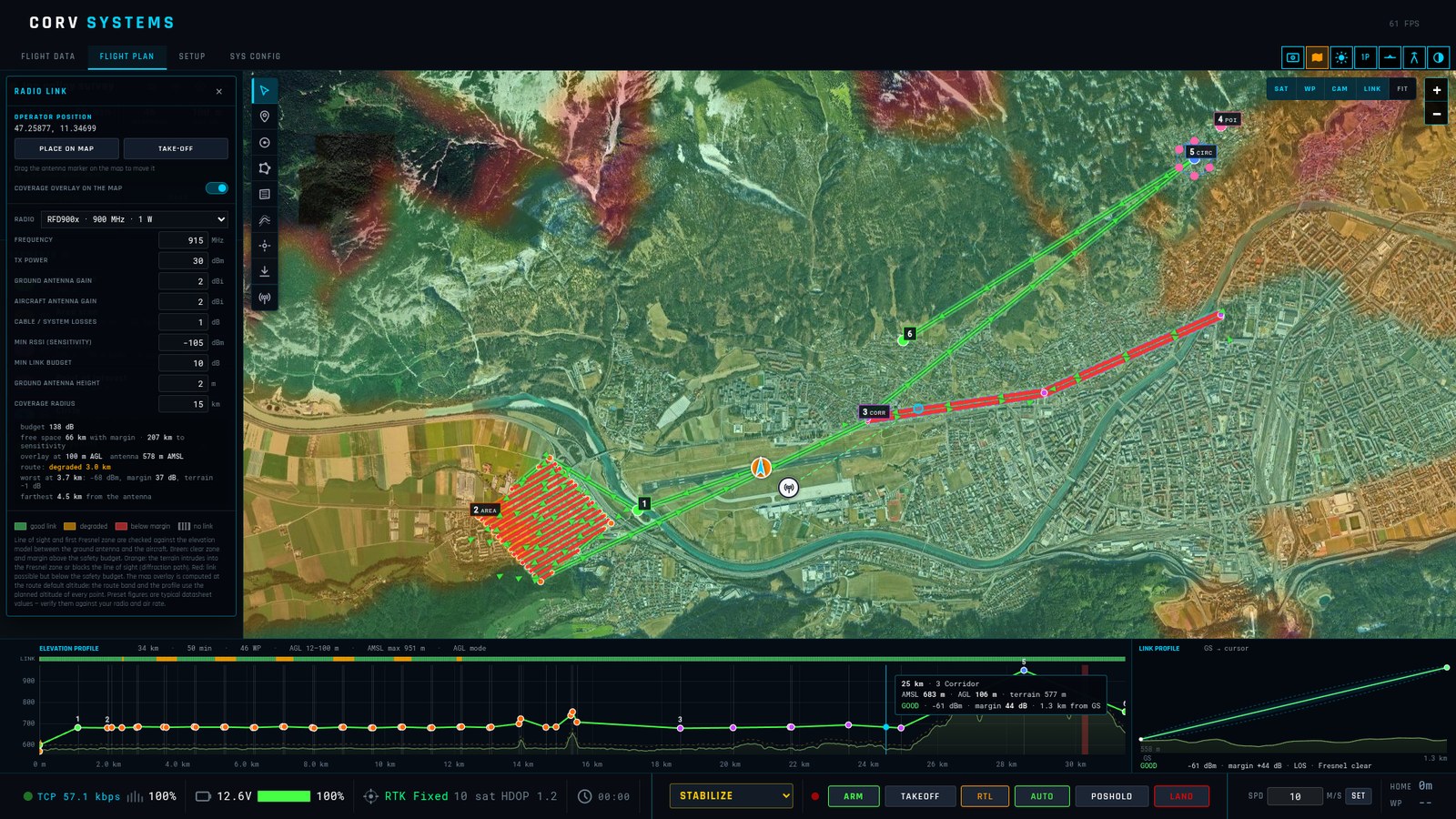
A drone is only as far away as its radio reaches, and hills get in the way. On the FLIGHT PLAN page the LINK layer shows where the telemetry link will work over the real terrain, and checks the planned route against it.
Set it up
-
The radio — radio icon on the route card. Pick one from the list or enter your own:
Preset Frequency TX power Sensitivity RFD900x 915 MHz 30 dBm (1 W) −105 dBm RFD868x 868 MHz 27 dBm −105 dBm SiK telemetry 433 / 915 433 / 915 MHz 20 dBm (100 mW) −108 dBm Herelink 2.4 GHz 20 dBm −98 dBm Microhard pMDDL2450 2.45 GHz 30 dBm −96 dBm Doodle Labs Mesh Rider 2.45 GHz 30 dBm −98 dBm ExpressLRS 900 / 2.4 915 MHz / 2.44 GHz 30 / 24 dBm −117 / −108 dBm TBS Crossfire 900 MHz 33 dBm (2 W) −120 dBm The figures are typical datasheet values for planning; check them against your hardware and air rate. You can also set the antenna gains on the ground and on the aircraft, cable and system losses, the minimum link budget (the margin above the sensitivity you want), the ground antenna height and the radius of the coverage map. The radio is remembered for the next route.
- The operator — tool O: click where the ground antenna will be. Without it the take-off point is used.
- LINK — turn the layer on.
Reading the map
| Colour | |
|---|---|
| light green | the link works with at least the minimum margin |
| orange | it works, but the terrain costs part of it |
| red | it works, with less than the minimum margin |
| nothing | no link |
The planned route gets a halo in the same colours, and a band under the elevation profile shows the link along the whole flight.
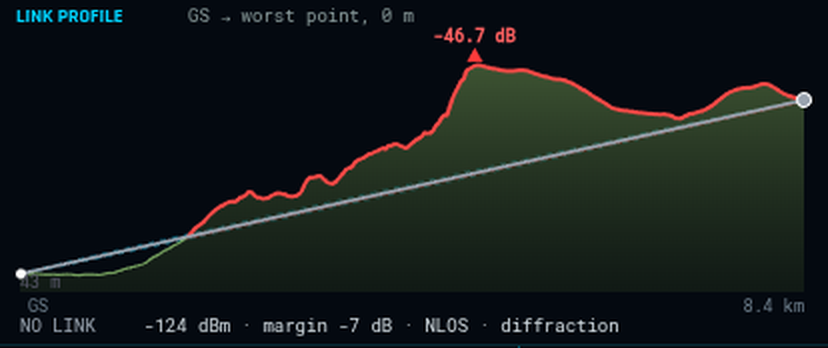
The LINK PROFILE cut shows the terrain between the antenna and the point under the cursor — or the worst point of the route — with the Earth’s bulge, the first Fresnel zone and its 60 % core, the ground that intrudes into it in red, and the loss at the worst ridge. In the picture a mountain between operator and aircraft costs 46.7 dB and the link is lost.
The model
The check is the one an RF planner makes: free-space path loss for the frequency and distance, a straight line of sight from antenna to aircraft, the first Fresnel zone around it (the radio needs that ellipse clear, not just the line), the diffraction loss when a ridge cuts into it, and the curvature of the Earth. It does not model vegetation, buildings, rain, interference or antenna patterns — read it as the best case over bare terrain.
ArduPilot’s telemetry pages cover the radios themselves and their setup on the vehicle; what the vehicle does when the link is lost is its GCS failsafe — see Vehicle setup → Failsafe.