Vehicle setup (SETUP)
The SETUP tab groups its pages in four menus on the left: COMMS, VEHICLE SETUP, TUNING, TOOLS. Click a menu title to fold it. A green dot beside a page means that feature is active right now (a link connected, a calibration running, the LiDAR or ROS streaming). On an INAV or Betaflight link (MSP) the pages that only speak MAVLink are greyed out, each saying where that setting lives instead. The settings of the GCS itself are on the SYS CONFIG tab.
Calibration, failsafes and tuning change how the vehicle flies: follow the ArduPilot page linked in each section for your vehicle type and firmware version. Most pages have READ FROM VEHICLE (load the current values) and WRITE (send yours): always read first, so you start from what is on the vehicle.
| Menu | Pages |
|---|---|
| COMMS | Connection · Cellular link · Telemetry forward · RTK / GPS inject |
| VEHICLE SETUP | Accelerometer · Compass · Gyro / Baro · Radio cal · Joystick / RC · Flight modes · Failsafe · Servo / relay |
| TUNING | PID tuning · Ext tuning · Vibrations · Parameters |
| TOOLS | Simulation · CORV setup · LiDAR · ROS |
COMMS
Connection
CONNECTION panel:
| Field | |
|---|---|
| CONNECTION TYPE | MAVLink Serial, MAVLink UDP, MAVLink TCP, CORV Binary (Legacy), MSP Serial (INAV / Betaflight), MSP TCP (INAV SITL). A hint under it says what each is for. Only the fields of the chosen type are shown. |
| POLL RATE (MSP) | MSP is request / response, so the poll rate is the telemetry rate: Normal for USB or 115 200 baud, Slow link for a long-range radio. |
| SERIAL PORT + SCAN | SCAN lists the serial ports of the PC (USB telemetry radio, the autopilot’s USB). |
| BAUD RATE | 9 600 to 921 600. 57 600 for SiK / RFD radios, 115 200 on the autopilot’s USB, 460 800 for CORV. |
| UDP HOST / UDP PORT | 127.0.0.1:14550 by default: the GCS listens on that port for MAVProxy, mavlink-router, a companion computer, Herelink. |
| TCP HOST / TCP PORT | 127.0.0.1:5760: a SITL, also on another PC or in WSL. |
| CONNECT / DISCONNECT | Opens the link and requests the data streams; closes it. |
FIRMWARE INFO shows what answered: AUTOPILOT (ArduPilot, INAV…), VEHICLE TYPE and SYSTEM ID. The connection types in detail are in Getting started.
Cellular link
A link over the mobile network to an LTEtelem module on the vehicle, through a relay server. Everything after the handshake is encrypted end to end with AES-256: the relay forwards the records but cannot read or alter them.
Every module has its own key, and the relay holds none: modules do not have to be registered on it. The module and the GCS both prove they have the key by signing the relay’s challenge with an Ed25519 key derived from it, and the relay pairs them by that key. A wrong key is therefore not refused: the GCS simply never meets the module, which stays offline on the relay. The MODULE line then shows the key fingerprint, to compare with e2e_key_fp on the module (~cfg GET).
The flight controller behind the module may speak MAVLink (ArduPilot) or CORV-2 binary (CORV board): the GCS tells them apart by themselves, packet by packet, and keeps the module’s own MAVLink (signal and LTE cell) apart from the vehicle’s telemetry. A CORV board is shown as on the USB link.
| Panel / field | |
|---|---|
| CELLULAR MODULE → MODULE ID | The module’s ID (e.g. CRV-4B58), shown by the relay and in the status; the key, not the ID, selects the module. |
| AES-256 KEY + SHOW | The module’s 64-hex-character key; SHOW reveals it while typing. |
| REMEMBER KEY ON THIS COMPUTER | Stores the key encrypted by the operating system’s keychain (never in plain text). |
| CONNECT / DISCONNECT | Starts / stops the link. Once up, it is the vehicle link: the command bar shows LTE and the signal in dBm. |
| RELAY → HOST / PORT | The relay server: the CORV relay 94.177.202.247, port 5765, by default. |
| CERT SHA-256 + PIN | Optional TLS certificate pinning: PIN takes the fingerprint of the certificate the relay presented on the last connection, after which a different certificate is refused. |
| LINK STATUS | STATE, MODULE (online or not), MODULE SESSION, RELAY TLS, RECORDS IN / OUT, REJECTED (records failing authentication or replayed), TRAFFIC, LAST DATA (age), RECONNECTS, LAST ERROR. |
| LTE CELL MAP | The cell the module reports (CORV_CELL_INFO, every 2 s): SERVING CELL (operator, eNB, sector, PCI, EARFCN with band and downlink frequency), SIGNAL (RSRP, RSRQ, SINR, RSSI), NEIGHBOURS, CELL CHANGES, MAST (position and where it comes from, or not found). SHOW CELL SITES ON THE MAP and ALL OPERATORS set the map overlay (LTE cells). The databases, first one wins: ADDED (files downloaded or imported here), BUILT-IN (Italy, San Marino, Vatican City: OpenCelliD of the installer’s date, OpenCelliD June 2024, Mozilla Location Service March 2024), DOWNLOADED (OpenCelliD June 2024 around the vehicle, or a whole country with DOWNLOAD 2024 COPY), ONLINE LOOKUPS (serving cells found in beaconDB / the OpenCelliD API). LOOK UP MISSING CELLS ONLINE turns the lookup off. OPENCELLID TOKEN (free account at opencellid.org) enables the OpenCelliD API lookup and DOWNLOAD FROM OPENCELLID, today’s file of the chosen country (OpenCelliD allows two downloads of a file a day). IMPORT CSV adds a file in the OpenCelliD or MLS layout. CLEAR deletes downloaded, imported and looked-up cells; the built-in ones stay. |
Telemetry forward
Copies of the vehicle telemetry for other equipment — an antenna tracker, an OSD, a second GCS. Several outputs can run at once.
ADD OUTPUT panel:
| Field | |
|---|---|
| OUTPUT TYPE | UDP Client — sends to a HOST and PORT (another GCS on 14550); UDP Server — listens on a LISTEN PORT and sends to whoever connects; Serial Port — a SERIAL PORT (⟳ rescans) at a BAUD RATE (2 400 – 115 200). |
| PROTOCOL | MAVLink Passthrough: every packet as received; LTM (Lightweight Telemetry): position, attitude and status in the compact one-way format of antenna trackers and OSDs. |
| WRITE ACCESS (BIDIRECTIONAL) | MAVLink only: packets received from this output are injected into the vehicle link, so a second GCS can also send commands. Leave off for display-only copies. |
| ADD OUTPUT | Starts it; errors (port busy) are shown under the button. |
ACTIVE OUTPUTS lists the running outputs with their state and a REMOVE button. CURRENT DATA shows the LAT, LON, ALT, HEADING and GROUNDSPEED being forwarded.
RTK / GPS inject
Corrections for centimetre positioning, forwarded to the vehicle as GPS_RTCM_DATA.
| Panel / field | |
|---|---|
| CORRECTION SOURCE → SOURCE | NTRIP Caster (Internet) or Serial Base Station; the line below shows the connection state. |
| NTRIP CASTER → HOST / PORT | The caster (port 2101 usually). |
| MOUNTPOINT + LIST | The stream to use; LIST downloads the caster’s sourcetable and shows it in SOURCETABLE to pick from. |
| USERNAME / PASSWORD, USE TLS | Credentials; TLS for casters on HTTPS. |
| GGA UPLOAD (VRS) | Network (VRS) casters need the rover’s position: Vehicle position (from the telemetry), Manual position (LAT / LON / ALT fields appear), or Off for a single base. GGA INTERVAL 1–30 s. |
| SERIAL BASE STATION → SERIAL PORT (⟳) / BAUD RATE | A base receiver on a USB port of the PC. |
| CONNECT / DISCONNECT | Start / stop the corrections. |
| RTK STREAM STATUS | STATUS, SOURCE, MSG RATE, TOTAL MSGS, BYTES RX, GGA SENT, RECONNECTS, and the RTCM MESSAGE TYPES received, by number and name (1005 base position, 1074/1077 GPS, 1084/1087 GLONASS, 1094/1097 Galileo, 1124/1127 BeiDou, 1230 GLONASS biases). |
| DRONE RTK STATUS | What the vehicle’s receiver does with them: GPS FIX (RTK float / RTK fixed), SATELLITES, HDOP, BASELINE (distance to the base), ACCURACY, IAR HYPOTHESES (ambiguity resolution candidates — fewer is closer to fixed). |
ArduPilot: RTK correction, GPS for yaw.
VEHICLE SETUP
Accelerometer
| Panel | |
|---|---|
| ACCELEROMETER CALIBRATION | The six-position calibration as Mission Planner runs it, disarmed. CALIBRATE ACCEL, keep the vehicle still while the gyros are measured, then for each position the autopilot asks for — level, left side, right side, nose down, nose up, on its back — the matching drawing lights up: hold the vehicle still that way on a flat surface and press CONTINUE. ABORT stops. The log underneath shows the autopilot’s messages and the result. |
| LEVEL | CALIBRATE LEVEL sets AHRS_TRIM so the attitude reads level when the vehicle sits level: place it level and still, as it flies. |
| SIMPLE ACCEL CAL | One position only (level, still), for vehicles too large to turn over. Less accurate; Copter firmware. |
| STORED CALIBRATION | READ FROM VEHICLE lists the offsets and scale factors of every accelerometer and the level trim. Scales far from 1.0 or large offsets point to a bad calibration or a damaged IMU. |
ArduPilot: accelerometer calibration.
Compass
ONBOARD MAG CALIBRATION:
| Control | |
|---|---|
| START | Starts the autopilot’s onboard calibration. Turn the vehicle slowly through every attitude — nose down, tail down, each side down, upside down — until every compass’s bar is full. Keep away from metal, cars and cables. |
| ACCEPT | Saves a good result that was not saved automatically. |
| CANCEL | Stops the calibration. |
| FITNESS | COMPASS_CAL_FIT: how close to a sphere the samples must be — Very strict (4), Strict (8), Default (16), Relaxed (32). Relax it only for a vehicle with unavoidable interference. |
| AUTO-ACCEPT A GOOD RESULT | Saves a good result as soon as it is found, without ACCEPT (default on). |
| REBOOT AUTOPILOT | Appears after a saved result: the new offsets are used after a reboot. |
The 3D view beside it plots every magnetometer sample around the vehicle and shades the sphere green where the autopilot has samples; the latest sample is a white marker and the nearest section still missing is orange: turn the vehicle until the marker reaches the orange patch. Drag to turn the view, scroll to zoom, double-click to reset. Its toolbar: MAG 1 / 2 / 3 (which compass the sphere shows), the sample count, CLEAR (drop the samples drawn), RESET VIEW. After the calibration a table shows each compass’s result, fitness (mG), offsets, scale and detected orientation; a failure says why (BAD ORIENTATION — check COMPASS_ORIENT, BAD RADIUS, RESIDUALS HIGH…).
COMPASSES — READ FROM VEHICLE lists the compasses in priority order: device, bus, whether it is used, internal / external mount, orientation, offsets.
LARGE VEHICLE MAGCAL — for a vehicle too large to turn: point its nose at a known true heading, with a GPS fix, type it in NOSE HEADING (° TRUE) and press CALIBRATE FROM HEADING; the offsets come from the world magnetic model.
ArduPilot: compass calibration, large vehicle MagCal.
Gyro / Baro
| Panel | |
|---|---|
| GYROSCOPES → CALIBRATE GYROS | Measures the gyro offsets: keep the vehicle completely still for a few seconds. ArduPilot also does this at every boot unless INS_GYR_CAL is 0. |
| BAROMETER → CALIBRATE BARO | Takes the current pressure as ground level: the altitude reads zero here. Vehicle still, out of the wind and the prop wash. |
The result of each appears under its button.
Radio cal
Live bars of every RC input channel (the PWM the receiver delivers).
- START CALIBRATION (it becomes STOP CALIBRATION).
- Move every stick and switch to both ends; the bars record minimum and maximum.
- Centre the sticks, press STOP CALIBRATION, then SAVE CALIBRATION to write
RCn_MIN,RCn_MAX,RCn_TRIM.
RESET discards what was recorded. ArduPilot: radio control calibration.
Joystick / RC
Fly with a gamepad through RC override (RC_CHANNELS_OVERRIDE): the GCS sends the stick positions as RC channels.
| Control | |
|---|---|
| ENABLE RC OVERRIDE | Starts sending. While on, the gamepad overrides the RC receiver on the channels it maps. |
| GAMEPAD + SCAN | The gamepads the PC sees; press a button on the pad if it does not appear, then SCAN. |
| SEND RATE | 10, 25 (default) or 50 Hz. |
| STATUS | Disabled, active, or SUSPENDED — the pad was unplugged, or sends no data because the GCS window lost focus: the RC channels are released to the receiver, and override resumes when the pad comes back. |
| AXIS MAPPING | One row per axis: AX n, the RC channel it drives, INV (reverse), DZ (dead zone 0–50 %, ignored around the centre), a live bar and value. |
| CHANNEL OUTPUT (PWM) | The PWM being sent on CH1–CH18. |
ArduPilot: joystick. A sub only takes pilot input from its own GCS system ID (SYSID_MYGCS, 255), and reacts when the input stops for a few seconds (pilot control failsafe).
Flight modes
The mode switch on the radio:
| Field | |
|---|---|
| MODE CHANNEL | The RC channel of the mode switch (5–8; FLTMODE_CH). |
| MODE 1 … MODE 6 | The mode for each PWM band of that channel: 1000–1230, 1231–1360, 1361–1490, 1491–1620, 1621–1749, 1750–2000 µs (FLTMODE1…6). A 3-position switch uses modes 1, 4 and 6. |
| READ FROM VEHICLE / WRITE TO VEHICLE | Load / send the six modes and the channel. |
What each mode does: Flight modes. ArduPilot: flight mode configuration.
Failsafe
| Panel / field | Parameter | |
|---|---|---|
| BATTERY → LOW VOLTAGE / CRITICAL VOLTAGE | BATT_LOW_VOLT, BATT_CRT_VOLT | Thresholds in volts (under load). |
| LOW ACTION / CRITICAL ACTION | BATT_FS_LOW_ACT, BATT_FS_CRT_ACT | Disabled, Land, RTL, SmartRTL or RTL, SmartRTL or Land, Terminate. |
| RC / GCS → RC FAILSAFE | FS_THR_ENABLE | Disabled; Enabled – Always RTL; Continue Auto; Always Land. |
| RC PWM THRESHOLD | FS_THR_VALUE | The throttle PWM below which the receiver is considered lost (975 by default; set the receiver’s failsafe output below it). |
| GCS FAILSAFE | FS_GCS_ENABLE | What happens when the GCS heartbeat is lost — same choices. |
| READ FAILSAFE PARAMS / WRITE FAILSAFE PARAMS | Load / send them all. |
What each action does is the vehicle’s: ArduPilot Copter, Plane, Rover, Sub failsafes, and the Copter dead-reckoning failsafe for a GPS lost in flight.
Servo / relay
| Panel | |
|---|---|
| SERVO OUTPUT | Live bars of every servo output (SERVO_OUTPUT_RAW): what the autopilot sends to motors and servos. |
| RELAY CONTROL | RELAY 1–4: each button toggles the relay ON / OFF (MAV_CMD_DO_SET_RELAY) — a camera trigger, a light, a payload release. |
| MANUAL SERVO TEST | SERVO # (1–12), a PWM slider (1000–2000 µs) and SEND (MAV_CMD_DO_SET_SERVO): moves a servo to check its travel and direction. Never on a motor output with propellers fitted. |
ArduPilot: servo, relay, auxiliary functions.
TUNING
PID tuning
READ FROM VEHICLE loads every value on the page, WRITE ALL sends them all; the status beside them reports progress. The panels shown depend on the vehicle type reported:
| Vehicle | Panels |
|---|---|
| Copter, Sub | RATE PID — roll, pitch, yaw P / I / D (ATC_RAT_*); ANGLE P — roll, pitch, yaw (ATC_ANG_*_P); PRIMARY CONFIG — THR HOVER (MOT_THST_HOVER), SPIN ARM / SPIN MIN, CLIMB P / I (PSC_ACCZ_P/I), RC FEEL (ATC_INPUT_TC), ANGLE MAX, WP SPEED (WPNAV_SPEED), RTL ALT |
| Plane | RATE PID — roll and pitch P / I / D / FF (RLL_RATE_*, PTCH_RATE_*), yaw damper (YAW2SRV_*); ATTITUDE LIMITS — time constants and rate limits (RLL2SRV_*, PTCH2SRV_*); TECS — SPEED / HEIGHT — climb and sink rates, time constant, damping, integrator, speed weight, pitch limits, TECS_RLL2THR, TECS_VERT_ACC; PRIMARY CONFIG — cruise airspeed, min / max airspeed, roll and pitch limits, trim / min / max throttle |
ArduPilot: tuning process, AutoTune, Plane tuning, TECS.
Ext tuning
Sliders for the values tuned most often on a copter: RATE ROLL/PITCH (moves ATC_RAT_RLL_P and ATC_RAT_PIT_P together), RATE YAW, LOITER SPEED, WP SPEED, RTL ALT and PILOT SPEED UP (cm/s or cm, as ArduPilot stores them). READ FROM VEHICLE / WRITE TO VEHICLE.
Vibrations
Vibration on the three axes (VIBRATION, m/s²) as a live chart with its history, the current X / Y / Z values and the clipping counts of the three accelerometers (each clip is a moment the sensor hit its limit). Under 30 m/s² is good, 30–60 marginal, over 60 high — the numbers behind the VIBE annunciator. ArduPilot: measuring vibration.
Parameters
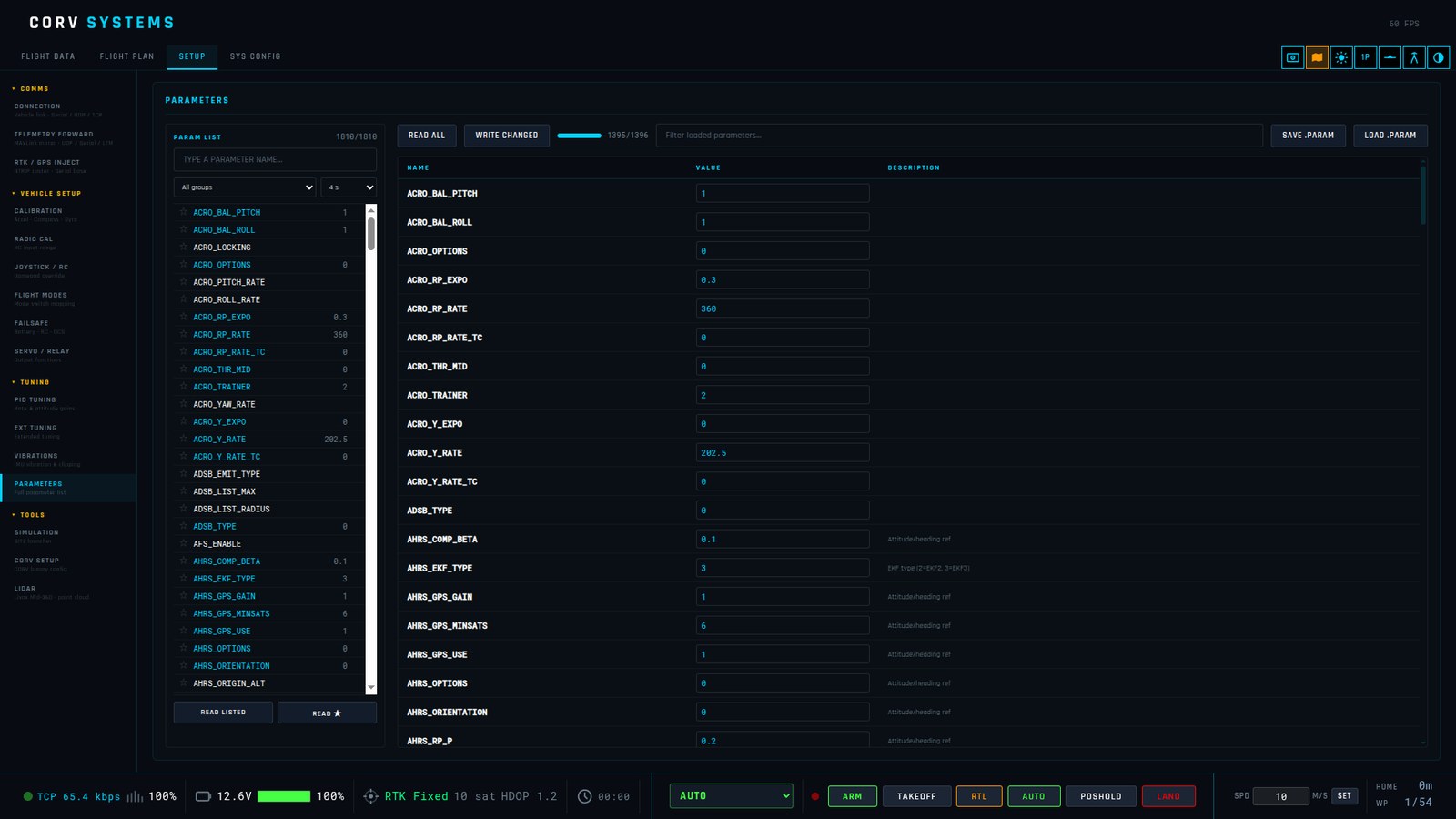
The full parameter editor, in two parts.
PARAM LIST (left) — every parameter name the GCS knows, to read only what you need: on a slow long-range radio a full read is thousands of packets and several minutes.
| Control | |
|---|---|
| Search box | Type part of a name. |
| All groups | Filter by group (ATC_, BATT_, COMPASS_…). |
| Timeout | 2, 4 (default), 8 or 15 s per request: raise it on a high-latency link. |
| Click a name | Reads that one parameter. |
| ☆ / ★ | Star a parameter for quick re-reading (remembered). |
| READ LISTED | Reads every parameter currently listed (after a search or group filter). |
| READ ★ | Reads all starred parameters. |
| Queue | The requests in progress and those that timed out. |
Editor (right):
| Control | |
|---|---|
| READ ALL | Loads the whole list (progress bar and count beside it). |
| WRITE CHANGED | Sends every value you edited (an edited value gets an orange border) and reports how many were written. |
| Filter box | Filters the loaded parameters by name. |
| SAVE .PARAM | Saves the loaded list to a Mission Planner-compatible .param file (NAME,VALUE per line) — a backup before you change anything. |
| LOAD .PARAM | Opens a .param file and writes every parameter in it to the vehicle straight away, one by one, then says how many were loaded. There is no preview: load only a file made for this vehicle and firmware, disarmed. |
| Table | NAME, VALUE (click to edit, Enter to confirm), DESCRIPTION. |
The reference is ArduPilot’s Copter / Plane / Rover / Sub parameter lists.
TOOLS
Simulation
ArduPilot SITL with one click — vehicle type, version, home, speed-up, DOWNLOAD, LAUNCH & CONNECT, STOP, and a manual UDP connection. See Simulator.
CORV setup
Configuration of the onboard CORV autopilot over its binary protocol (connect with CORV Binary first). READ loads the configuration; WRITE + SAVE sends it and stores it on the board.
| Panel | Fields |
|---|---|
| GPS | GPS TYPE (u-blox ZED-F9P, Septentrio Mosaic-X5), GPS BAUD RATE |
| TELEMETRY OUTPUT | SERIAL1 PROTOCOL (binary custom, VectorNav VN-300 emulation), SERIAL1 BAUD, USB / SERIAL1 telemetry on/off, NAV / DEBUG / RAW message rates (Hz) |
| FEATURE FLAGS | magnetometer and its bus (SPI onboard RM3100 / CAN), Earth-rotation compensation, ZUPT (zero-velocity updates), accelerometer levelling, wind estimation, airspeed with its sensor and bus, pitot axis, airspeed ratio, sideslip and AoA validity limits |
| BOARD & HARDWARE | BOARD TYPE (FULL dual IMU + mag, MINI single IMU), GPS NOISE SIM (adds simulated GPS noise, for tests) |
| PARTICLE FILTER | number of particles (32–256), ESS resampling threshold, roughening of attitude / position / velocity |
| SHARED EKF BIAS NOISE, INITIAL COVARIANCE, PER-PARTICLE PROCESS NOISE | the estimator’s noise model, in scientific notation |
Change these only with the CORV documentation at hand: they decide how the board estimates its attitude and position.
LiDAR
A Livox Mid-360 read directly over the network and mapped live as a point cloud from the telemetry — see LiDAR point cloud.
ROS
LiDAR, echo sounder and sonar data from ROS through rosbridge, averaged into a 3D surface — see ROS surface, with every setting of this page explained.