Simulator
SETUP → TOOLS → SIMULATION runs ArduPilot’s software-in-the-loop simulator (SITL) — the real autopilot firmware, flying a physics model on the PC — and connects to it. Everything in the GCS works against it: missions, modes, parameters, failsafes, logs. ArduPilot: SITL, using SITL for testing.
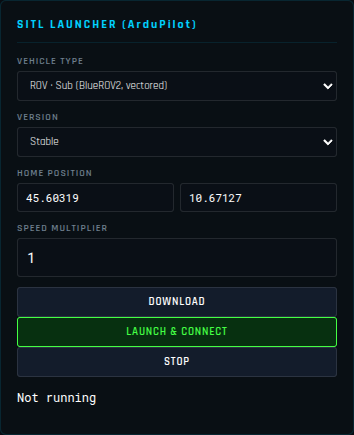
Launch
| Field | |
|---|---|
| VEHICLE TYPE | See the list below |
| VERSION | Stable, Beta or Latest (development) firmware |
| HOME POSITION | Latitude and longitude of the start; the altitude is taken from the terrain under it (0 m for a ROV, see below) |
| SPEED MULTIPLIER | Run the simulation up to 10× faster than real time |
| Button | |
|---|---|
| DOWNLOAD | Downloads the firmware of the chosen vehicle and version only (from firmware.ardupilot.org, kept in the app’s data folder) — do it while you have a network, to launch later offline. |
| LAUNCH & CONNECT | Downloads the firmware if it is not there yet, starts the simulator and connects to it over TCP. |
| STOP | Disconnects and ends the simulator. |
The line underneath shows the state (Not running, downloading, running, an error). On Windows the Linux binary runs inside WSL, which must be installed (wsl --install in an administrator terminal, then a reboot).
| Vehicle | Model |
|---|---|
| Copter (Quad) | ArduCopter, standard quad |
| Copter 12S High-Speed | ArduCopter on a fast 12S quad frame |
| Tricopter 12S | ArduCopter, symmetric 12S tricopter (3 × Hobbywing X8 G2) |
| Helicopter | ArduCopter, traditional helicopter |
| Plane | ArduPlane on a 22 kg jet model: 300 km/h cruise, about 660 km/h top speed (needs ArduPlane 4.7+) |
| QuadPlane | ArduPlane VTOL |
| Rover | ArduRover |
| Boat (ArduRover, waves on Lake Garda) | ArduRover on the motorboat model |
| ROV · Sub (BlueROV2, vectored) | ArduSub, with GPS |
| ROV · no GPS (dead reckoning) | ArduSub with no GPS at all |
The boat
Boat launches ArduRover on SITL’s motorboat (default_params_boat.parm) and moves the home to the southern basin of Lake Garda (45.4960 N, 10.6490 E). It is set up as a sonar survey boat: at most 2 m/s on the lanes, a 5 m/s southerly with gusts, and 0.5 m waves 12 m long coming from the south, so the hull rolls, pitches and heaves in the telemetry. SITL’s boat makes waves only once armed, and heaves only with SIM_WAVE_ENABLE 2. The garda scene of scripts/rosbridge-sim.js maps the same water — the lake bed with a wreck, a car, a container, a light aircraft, a pipeline and more on it — and its sonars (an imaging sonar, a sector-scanning sonar) are ray-cast from the boat’s true pose: see ROS. Parameters changed while the simulator runs (WP_SPEED, for one) are kept in its storage and are still there at the next launch.
The ROV
Choosing a ROV moves the home to the centre of Lake Garda (45.60319 N, 10.67127 E), unless you typed a home of your own. It is always launched at 0 m: ArduSub’s simulator keeps the water surface at 0 m MSL whatever the home altitude, and a sub launched at the lake’s own height (62 m in the elevation data) floats in the air and cannot dive. The GCS puts that 0 on the lake surface, as it does for a real ROV — the depth then reads correctly and the 3D view shows the vehicle under the lake. See Subs and ROVs.
ROV · no GPS starts ArduSub with the GPS driver and the simulated GPS off (default_params_subnogps.parm): the autopilot has no position at all, as a ROV without DVL or USBL. Launching it switches the relative navigation mode on; STOP puts it back as it was. ArduSub’s simulator has a flat bottom 50 m under the surface, so neither ROV dives deeper.
Driving a ROV: a gamepad in SETUP → Joystick / RC, or MANUAL_CONTROL from another program on the simulator’s second port (TCP 5762). ArduSub only takes pilot input from its own GCS system ID (SYSID_MYGCS, 255), and reacts when that input stops for a few seconds (pilot control failsafe) — in the simulator it disarmed the vehicle.
Your own simulator
SITL MANUAL CONNECTION connects over UDP to a simulator started elsewhere — MAVProxy’s output, sim_vehicle.py, a Gazebo setup — on 127.0.0.1:14550 by default. A TCP simulator (tcp:127.0.0.1:5760) connects from SETUP → COMMS → CONNECTION.